Luxor Instagram Puzzle Feed: A Practical Guide to Grid Planning
Managing a cohesive visual identity on Instagram often requires more than just posting individual images. For brands, influencers, and content creators, the overall aesthetic of the profile grid plays a significant role in first impressions and user engagement. The Luxor - Instagram Puzzle Feed is a digital template designed to simplify this process. It allows users to create a seamless, puzzle-style layout where multiple posts connect to form a larger, continuous image or design. This article explores the functionality, benefits, and practical considerations of using this tool to determine if it aligns with your social media strategy.
Understanding the Luxor Instagram Puzzle Feed
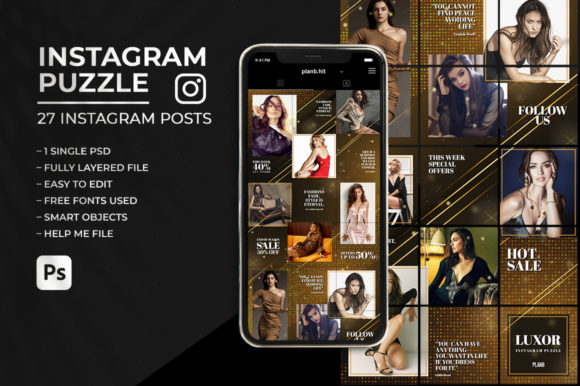
At its core, the Luxor template is a pre-designed Adobe Photoshop file (PSD) that structures twenty-seven individual square posts into a unified grid. Each post measures 1080px by 1080px, adhering to Instagram’s standard high-resolution requirements. The primary function of this tool is to enable users to curate their content weeks in advance. By utilizing smart objects and organized layers, users can replace placeholder images and text with their own assets, ensuring that the final output maintains a professional and trendy appearance.
The term "puzzle feed" refers to the technique of splitting a large image or design across multiple posts. When viewed on a mobile device, these posts appear as separate tiles in the grid. However, when a user visits the profile, the tiles align perfectly to create a panoramic or mosaic effect. The Luxor template facilitates this by providing a single PSD file compatible with Photoshop CS6 and above, ensuring that the beginning and end of the grid match for seamless, continuous use.
Why Consider a Puzzle Grid Template?
Content creators often face the challenge of maintaining visual consistency while producing frequent updates. Manual alignment of images across multiple posts is time-consuming and prone to error. A template like the Luxor Instagram Puzzle Feed addresses these pain points by offering a structured framework. Here are several reasons why individuals might be interested in this approach:
- Visual Cohesion: A puzzle grid creates a striking visual impact that can differentiate a profile from competitors. It signals attention to detail and brand professionalism.
- Time Efficiency: The ability to export all twenty-seven posts in one click significantly reduces the time spent on formatting and saving individual files.
- Advanced Planning: By curating content weeks in advance, users can maintain a consistent posting schedule without the daily pressure of creation.
- Ease of Use: With easy-to-edit smart objects, even users with basic Photoshop knowledge can replace images and text without disrupting the underlying design structure.
Key Features and Technical Specifications
Evaluating the technical aspects of the Luxor template is essential for determining its compatibility with your workflow. The product includes a single PSD file, a help file with instructions, and links to free fonts used in the design. Key features include:
- Layer Organization: Design elements are neatly organized in layers, allowing for straightforward editing. Users can toggle visibility, adjust colors, or modify text without affecting other components.
- Smart Objects: Image placement is handled via smart objects, which preserve the original quality of photos and allow for non-destructive editing. This ensures that resizing or rotating images does not result in pixelation.
- Seamless Continuity: The template is designed so that the end of one grid cycle matches the beginning of the next. This feature is crucial for users who intend to use the puzzle format indefinitely, as it prevents visual breaks when transitioning between sets of twenty-seven posts.
- Resolution Standards: Each post is optimized at 1080px x 1080px, which is the recommended resolution for Instagram to ensure clarity on high-density displays.
Benefits and Tradeoffs
While the Luxor Instagram Puzzle Feed offers significant advantages, it is important to consider both the benefits and the potential tradeoffs associated with puzzle grids.
Benefits
The most notable benefit is the aesthetic appeal. A well-executed puzzle grid can increase profile visits and follower retention due to its unique visual structure. Additionally, the template’s efficiency allows for batch processing. Instead of designing each post individually, users can work on the entire grid simultaneously, ensuring that color palettes and themes remain consistent across all twenty-seven images.
Tradeoffs and Considerations
However, puzzle grids are not without drawbacks. One major consideration is the user experience on mobile devices. While the grid looks impressive on a profile page, individual posts may appear fragmented when viewed in a follower’s feed. If a user scrolls past a single tile of a larger image, the context may be lost. Therefore, it is essential to ensure that each individual square also contains meaningful content or stands alone visually.
Another tradeoff is the reliance on specific software. The template requires Adobe Photoshop CS6 or later. Users who prefer mobile-based editing apps or alternative software like Canva or GIMP will not be able to utilize this specific PSD file. Furthermore, while the template simplifies the process, it still requires a basic understanding of Photoshop layers and smart objects. Beginners may need to invest time in learning these skills before they can effectively use the template.
Ideal Use Cases
The Luxor Instagram Puzzle Feed is particularly well-suited for certain types of users and scenarios:
- Brand Launches and Campaigns: Companies launching a new product can use the puzzle grid to reveal a large promotional image over several days, building anticipation and engagement.
- Portfolio Showcases: Photographers, designers, and artists can use the grid to display a wide-angle shot or a series of related works that tell a broader story.
- Event Promotion: For conferences, festivals, or workshops, a puzzle grid can provide an overview of the schedule, speakers, or venue map, encouraging users to visit the profile for more information.
- Long-Term Branding: Businesses aiming for a highly curated, magazine-style feed can use the template to maintain a consistent look and feel over extended periods.
When to Consider Alternatives
Despite its strengths, the Luxor template may not be the best fit for every user. Alternatives should be considered in the following situations:
- Lack of Photoshop Access: If you do not have access to Adobe Photoshop or prefer cloud-based tools, templates designed for Canva or other online platforms may be more appropriate.
- Focus on Individual Post Performance: If your strategy prioritizes the performance of individual posts in the feed rather than the profile grid aesthetic, a standard single-post template might be more effective. Puzzle grids can sometimes confuse algorithms if users do not engage with the fragmented images.
- Frequent Content Changes: If your content strategy involves rapid, spontaneous posting, the rigid structure of a twenty-seven-post grid may feel restrictive. In such cases, flexible, modular templates that allow for ad-hoc design changes might be preferable.
Making the Decision
Choosing whether to invest in the Luxor Instagram Puzzle Feed depends on your specific goals and technical capabilities. If you value visual cohesion, have access to Photoshop, and plan your content in advance, this template offers a robust solution. It streamlines the creation process and provides a professional framework for achieving a trending puzzle feed aesthetic.
However, if you prioritize ease of use on mobile devices, lack Photoshop skills, or focus primarily on individual post engagement, you may find other tools better suited to your needs. Ultimately, the decision should align with your broader social media strategy and resource availability. By carefully evaluating these factors, you can determine if the Luxor template is the right tool to elevate your Instagram presence.