Email Newsletter Template Design: A Practical Guide for Modern Business Communication
In the landscape of digital marketing, consistency is often the differentiator between a brand that is remembered and one that is ignored. Email Newsletter Template Design serves as the structural backbone of this consistency. For professionals ranging from corporate executives to independent freelancers, the ability to deploy high-quality, visually cohesive emails without starting from scratch is not merely a convenience; it is a strategic necessity. Whether you operate an e-commerce retail store, manage a photography portfolio, or run a content-heavy magazine, the underlying architecture of your email communication dictates how your audience perceives your professionalism.
The modern approach to email design has shifted away from complex, code-heavy layouts toward clean, flat design principles that prioritize readability and cross-device compatibility. This shift is reflected in the growing demand for multipurpose email templates that are not only aesthetically pleasing but also technically robust. By utilizing resources that offer completely editable layers and compatibility with industry-standard software like Adobe Illustrator, businesses can maintain a high standard of visual identity while significantly reducing production time.
The Strategic Value of Multipurpose Templates
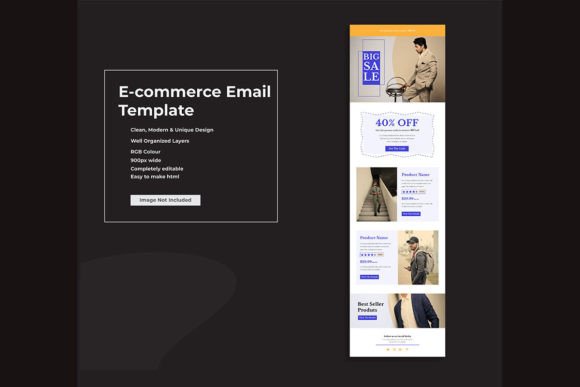
The term "multipurpose" in the context of Email Newsletter Template Design refers to versatility. A well-constructed template should not be rigidly locked into a single industry niche. Instead, it should provide a flexible framework that adapts to various content types. For a blogger, this might mean a layout that emphasizes long-form text and featured images. For an agency, it might require a grid system that showcases multiple service offerings or case studies simultaneously. For an e-commerce retailer, the focus shifts to product highlights, clear call-to-action buttons, and promotional banners.
The primary strength of using a standardized, professional template lies in efficiency. Creating a unique HTML structure for every campaign is resource-intensive and prone to errors. By adopting a pre-designed, well-organized system, marketers and designers can focus on content creation rather than troubleshooting code. This is particularly valuable for small business owners and freelancers who often wear multiple hats. The ability to swap out images, adjust text, and modify colors within a familiar interface allows for rapid deployment of campaigns without sacrificing quality.
Clean Professional Design and Flat Aesthetics
Visual clutter is the enemy of conversion. Contemporary Email Newsletter Template Design embraces flat design principles, which strip away unnecessary textures, shadows, and gradients in favor of clean lines, ample white space, and bold typography. This aesthetic choice is not just stylistic; it is functional. Flat designs load faster, render more consistently across different email clients, and are easier to read on mobile devices, which account for the majority of email opens today.
A clean professional design ensures that the recipient’s attention is directed toward the core message. When layers are well-organized and the hierarchy is clear, the user experience improves significantly. For photographers and designers, this means their work speaks for itself without being overshadowed by ornate framing. For corporate entities, it conveys a sense of modernity and transparency. The use of free Google Fonts further enhances this by providing access to a vast library of typography that is web-safe and legally compliant, ensuring that the text renders exactly as intended on the recipient’s screen.
Technical Flexibility and Editability
The true test of any design asset is its ease of modification. High-quality email templates are distinguished by their editability. When a template is described as "completely editable," it implies that every element—from the header logo to the footer social icons—can be customized to align with specific brand guidelines. This is where the inclusion of Adobe Illustrator EPS versions becomes critical. While the final output for email distribution is HTML, the design phase often occurs in vector-based software.
Having access to the source files in Illustrator allows designers to manipulate vectors without loss of quality. This is essential for resizing logos, creating custom icons, or adjusting graphical elements before exporting them for web use. Well-organized layers within these files save hours of work. Instead of hunting through a flattened image to isolate a specific component, a designer can toggle visibility, lock background elements, and make precise adjustments. This level of control is vital for agencies and corporate teams that must adhere to strict brand compliance standards.
Furthermore, the transition from design to code is streamlined when the HTML templates are built with best practices in mind. Responsive design is non-negotiable. A template that looks perfect on a desktop monitor but breaks apart on a smartphone is ineffective. Modern templates utilize fluid grids and media queries to ensure that columns stack correctly and text remains legible regardless of screen size. This reliability builds trust with the audience, as it demonstrates attention to detail and respect for the user’s experience.
Who Benefits Most from Structured Email Design?
The utility of professional Email Newsletter Template Design extends across a wide spectrum of industries. Understanding who benefits most can help organizations decide how to integrate these assets into their workflow.
- E-commerce and Retail: These sectors rely on frequent updates regarding sales, new arrivals, and seasonal promotions. A modular template allows for quick insertion of product grids and promotional banners, ensuring that time-sensitive offers reach customers promptly.
- Creative Professionals (Photographers, Designers, Freelancers): For these individuals, the email itself is a portfolio piece. A minimalist, flat design ensures that the visual work remains the focal point. The ability to customize colors and fonts allows them to mirror their personal brand identity seamlessly.
- Corporate and Agency Communications: Large organizations require consistency across multiple departments. A standardized template ensures that internal newsletters, client updates, and press releases all carry the same visual weight and professional tone, reinforcing brand authority.
- Publishers, Bloggers, and Magazines: Content-heavy emails require structures that prioritize readability. Templates with clear typographic hierarchies and dedicated spaces for featured articles help drive traffic back to the website without overwhelming the reader.
Evaluating Quality and Long-Term Value
When selecting an Email Newsletter Template Design, it is important to look beyond the initial visual appeal. Consider the long-term value and sustainability of the asset. A high-quality template is an investment that pays dividends over time through reduced design costs and improved engagement rates. Key indicators of quality include code cleanliness, documentation clarity, and support for major email clients such as Outlook, Gmail, and Apple Mail.
One common limitation to be aware of is the variability in how different email clients render HTML. While modern templates strive for universal compatibility, some older clients may still interpret CSS differently. Therefore, it is advisable to test templates thoroughly before widespread deployment. Additionally, while "free Google Fonts" offer extensive choices, it is prudent to stick to widely supported font families to ensure consistent rendering. Overly exotic typography may fail to load on certain devices, reverting to default system fonts and potentially disrupting the design layout.
Another practical consideration is the balance between customization and complexity. While having completely editable layers is advantageous, it requires a basic understanding of design principles. Users without design experience may find fully open-ended templates challenging to modify effectively. In such cases, starting with a more rigid structure and gradually introducing custom elements can be a safer approach. For those with design skills, however, the freedom to manipulate every aspect of the template offers unparalleled creative control.
Implementing Templates for Maximum Effectiveness
To maximize the effectiveness of your email communications, integrate your chosen template into a broader content strategy. Consistency in sending frequency, combined with consistent visual branding, helps build audience expectation and trust. Use the modular nature of multipurpose templates to A/B test different layouts. For instance, you might test a single-column layout against a two-column grid to see which generates higher click-through rates for your specific audience.
Moreover, ensure that your images are optimized for web use. High-resolution images from Adobe Illustrator should be exported at appropriate dimensions and compressed to reduce load times. Slow-loading emails can lead to higher bounce rates, negating the benefits of a beautiful design. Always include alt text for images to maintain accessibility and ensure that the message is conveyed even if images are blocked by the email client.
In conclusion, Email Newsletter Template Design is a critical tool for any entity seeking to communicate professionally in the digital age. By leveraging clean, flat design principles, editable source files, and responsive HTML structures, businesses and creators can achieve a balance between aesthetic excellence and operational efficiency. Whether you are a solo freelancer or a large corporation, the right template provides the foundation for meaningful engagement, allowing you to focus on what matters most: delivering value to your audience.